Live Streaming Tips
PPV Live Streaming: 5 Launch Mistakes to Avoid
Pay-per-view live streaming can be a powerful way to turn a special event, training session, concert, or exclusive conversation into a paid experience. But the details matter. If the ticketing flow is confusing, the replay plan is vague, or the promotion arrives too late, even a strong event can underperform in practice.
The good news is that most PPV problems are preventable. With a clear plan, the right access controls, and a smooth viewing experience, you can make it easier for the right audience to buy, show up, and watch without friction. PremStream supports creators who want to sell tickets to live streams, replays, and premium video, use promo codes, access customer purchase information, and work with major streaming software—so it is a practical fit for organizing the full PPV workflow.
Below are five costly mistakes to avoid before your next paid live stream, plus the fixes that help you create a better launch from the start.
1. Launching without a clear ticket and access plan
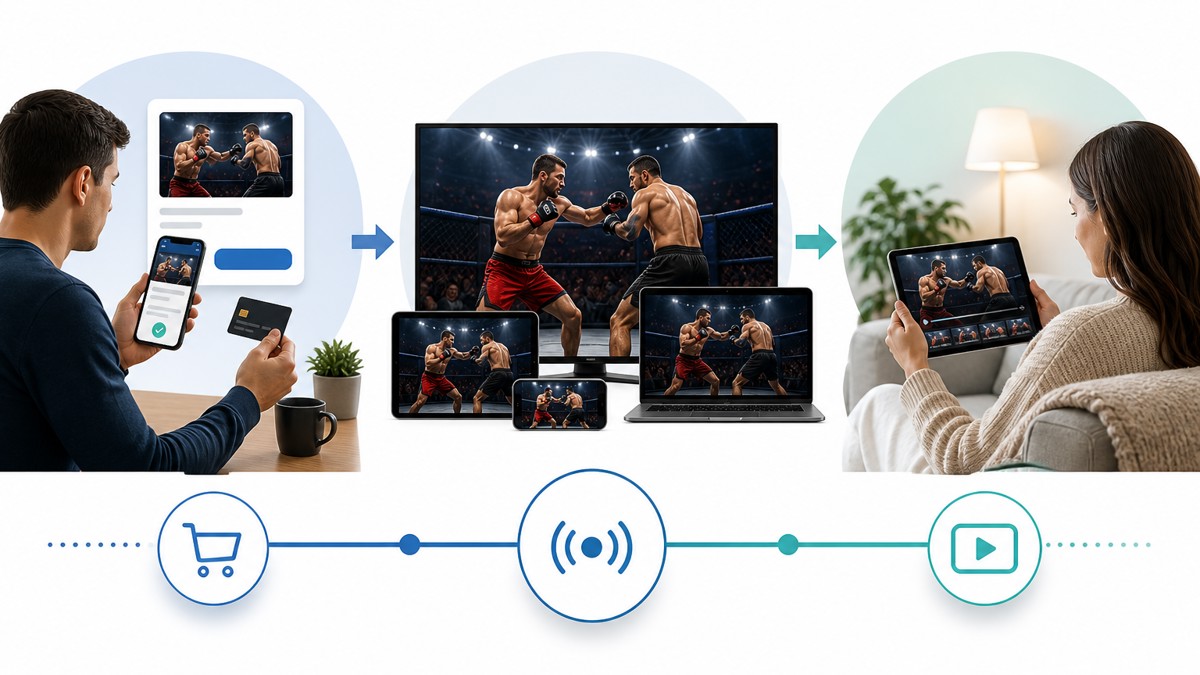
A PPV event succeeds when buyers know exactly what they are getting, when they will get it, and how they will watch it. A common mistake is treating the ticket as an afterthought instead of part of the viewing journey.
What to define before you promote
- What the ticket unlocks: the live stream, a replay, or both
- When access begins and ends
- Whether the event is live-only or includes on-demand viewing
- What viewers should expect after purchase
For example, a creator hosting a private workshop might sell live access plus a replay window for late viewers. That simple distinction reduces confusion and can improve buyer satisfaction. PremStream makes it easier to package live streams and premium video in a way that matches your event structure, rather than forcing a one-size-fits-all setup.
Fix: Write the access rules first, then build the sales page, confirmation message, and event reminder around those rules.
2. Promoting the event too late
One of the biggest PPV mistakes is waiting until the event is almost live before telling people about it. Paid streaming often needs more lead time than a free stream because buyers are making a purchase decision, not just clicking a reminder link.
A practical promotion rhythm
- Announce the event early with a simple value proposition
- Share what makes the live stream worth paying for
- Use reminders as the date gets closer
- Re-share the offer after strong audience questions or interest signals
If you have a customer list or prior viewers, use that information to build a direct message sequence instead of relying only on a social post. With PremStream, you can access customer purchase information, which helps you understand who has bought before and how to follow up with relevant offers.
Fix: Start promotion early enough to explain the value, not just the schedule.
3. Overcomplicating the checkout experience
PPV viewers often decide quickly. If the purchase path feels cluttered, the moment of interest can disappear. The mistake here is adding too many steps, too many explanations, or too much friction between curiosity and checkout.
Keep the offer simple
| Helpful approach | Risky approach |
|---|---|
| One clear event title | Multiple versions of the same offer |
| Simple access description | Long paragraphs before the buy button |
| Clear live and replay details | Unclear timing or access rules |
| Relevant promo code use when needed | Hidden discounts with no explanation |
A good PPV page should answer the basics quickly: what is included, when it happens, and what happens after purchase. If you offer a promo code, make sure it feels intentional and easy to apply. That way the discount supports conversion instead of creating confusion.
Fix: Remove extra steps that do not help the viewer decide or watch.
4. Forgetting the replay and premium video strategy
Many creators focus only on the live moment and forget that the replay can extend the value of the event. That is a missed opportunity. Not everyone can attend live, and not every paid viewer is ready at the same time.
Use replay as part of the offer
Think of replay access as a separate audience segment. Some viewers want the full live experience. Others want flexibility. Some may buy after the event if they know a replay is available. A replay plan can help you capture those buyers without changing the live event itself.
PremStream supports selling replays and premium video, which gives creators more than one way to monetize content. You can use the live event to create urgency, then keep the value going with on-demand access.
Fix: Decide whether the replay is included, when it becomes available, and how long viewers can access it.
5. Not planning the technical run-of-show
A polished PPV experience depends on more than content. Audio checks, scene transitions, camera framing, and software setup all affect whether the event feels premium or chaotic. When creators skip a run-of-show, small issues can become viewer distractions.
Technical items to confirm before going live
- Streaming software is connected and tested
- Audio levels are clear and consistent
- Backup plan exists for stream interruptions
- Opening and closing moments are scripted
- Viewer instructions are ready in case of support questions
Major streaming software can work well in a PPV setup when you test it in advance and keep your event flow simple. If your audience is paying for access, the technical details become part of the product.
Fix: Run a full rehearsal that includes the stream setup, the purchase flow, and the viewer handoff.
FAQ: PPV live streaming basics
What should a PPV live stream include?
A strong PPV live stream should clearly state what viewers get, when the event starts, how access works, and whether a replay is included.
Can I sell both live access and replay access?
Yes. Many creators use both. Live access serves viewers who want the real-time experience, while replay access helps people who cannot attend on schedule.
How can promo codes help with PPV events?
Promo codes can support early access offers, audience-specific deals, or launch promotions. The key is to use them intentionally and make redemption easy to understand.
Why is customer purchase information useful?
It helps you identify repeat buyers, segment your audience, and follow up with more relevant event invitations.
Conclusion
PPV live streaming works best when the event feels easy to buy, easy to watch, and easy to remember. That means planning the access rules, promoting early, simplifying checkout, using replays wisely, and testing the technical setup before launch. If you take care of those five areas, you give your audience fewer reasons to hesitate and more reasons to return.
If you are ready to build a smoother paid streaming workflow, explore PremStream features and start onboarding. It is a practical next step for creators who want to sell live access, replays, and premium video with more control over the full experience.